FAQ's
Why would I need an image under 22 KB?
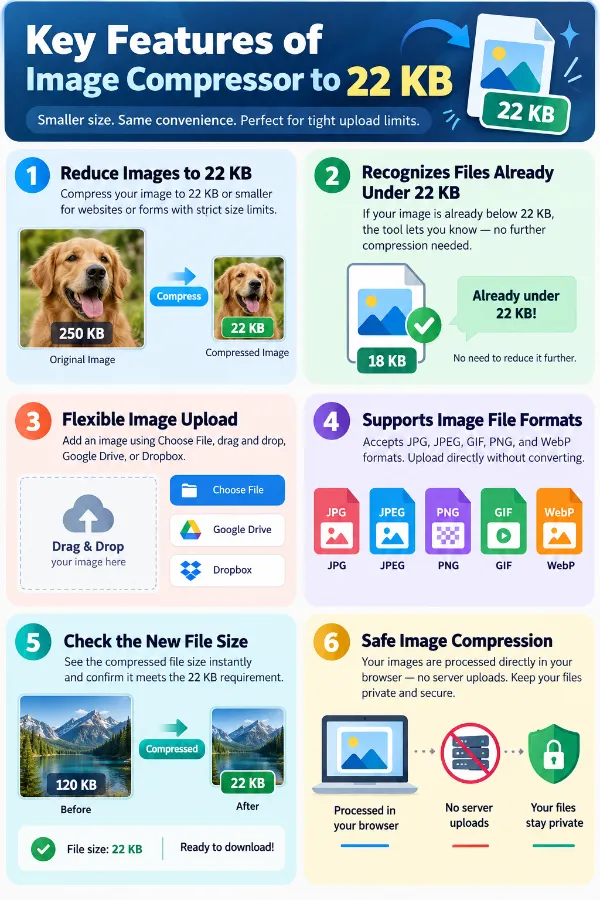
A website, form, email system, or application may impose a very small file-size limit for uploads. In that situation, reducing the image to 22 KB or below can help meet the stated requirement. You should also check whether the destination has separate dimension or format restrictions.
Can a large photo really be compressed to 22 KB?
A large photograph can be reduced to 22 KB, but reaching such a small size may require substantial compression. Fine details, textures, and other visual information may become less distinct. Always review the resulting image before using it.
What happens when the original image is much larger than 22 KB?
The greater the difference between the original and 22 KB, the more aggressive the reduction needs to be. A multi-megabyte photograph may therefore show more noticeable changes than an image that is already close to the target. Check both the final file size and its appearance.
Will reducing an image to 22 KB change its dimensions?
File size and image dimensions are separate properties. Compressing an image to 22 KB does not necessarily mean reducing its width and height. If a website requires specific pixel dimensions as well as a 22 KB limit, both requirements need to be checked.
Why can an image under 22 KB look different from the original?
Reaching 22 KB may require removing a significant amount of image data, especially when the original is large or detailed. Photos, text-heavy screenshots, and graphics with fine elements can respond differently to strong compression. The smaller file should therefore be checked at its intended viewing size.
What if 22 KB is too small for my image?
If the destination allows a larger file, using a less restrictive limit can help retain more visual detail. If 22 KB is mandatory, some reduction in image quality may be unavoidable for complex images. In either case, compare the compressed result with the original before submitting it.
Does reaching 22 KB mean the image is exactly 22 KB?
No. A target of 22 KB generally means the image is reduced to 22 KB or below, rather than being guaranteed to stop at exactly 22 KB. The resulting file may therefore be smaller than the stated target.
Why is the final file size important after compression?
The displayed file size tells you whether the resulting image is actually within the required limit. This is particularly important when a destination has a strict maximum rather than an approximate recommendation. Check the final size before uploading instead of assuming that compression automatically meets the requirement.
What should I check before submitting a 22 KB image?
First, confirm that the file is within the 22 KB limit. Then inspect important details such as text, logos, faces, edges, or other information that must remain recognizable. Finally, check any separate requirements for image dimensions and file format.
Is it possible to maintain image quality at such a small size as 22 KB?
Maintaining high image quality at 22 KB can be challenging, especially for complex or high-resolution images. Significant compression may lead to loss of detail, blurriness, or artifacts. It’s important to review the compressed image to ensure it still meets your needs.
Can I compress images to 22 KB without losing too much detail?
Achieving a balance between size and quality depends on the original image. Simple graphics or images with fewer colors compress more effectively. For detailed photographs, you might need to sacrifice some quality to reach 22 KB. Always preview the result before finalizing.
What formats are best for compressing images under 22 KB?
Formats like JPEG, WebP, or PNG (for graphics with transparency) are commonly used for small-sized images. JPEG and WebP are generally better for photographs, offering higher compression ratios, while PNG is suitable for images requiring transparency or sharp edges.
Will compressing my image to 22 KB affect its usability?
Yes, aggressive compression to reach 22 KB can impact readability, clarity, or visual appeal. For example, text may become blurry or unreadable, and fine details may be lost. Always verify that the compressed image still serves its intended purpose.
How can I tell if my compressed image is too small or too large for my needs?
Check the final file size and compare it to the specified limit. Also, view the image at its intended display size to assess if the quality is acceptable. If the image looks too degraded or is still too large, consider adjusting compression settings or format.
What are the best practices for preparing images under 22 KB?
Resize images to the necessary dimensions before compression. Choose the appropriate file format for your content. Use compression tools that allow you to preview quality in real-time. Start with a higher quality setting and reduce gradually to find the best balance.
Does the tool use the same compression settings for all types of images?
No. The tool automatically compresses the image toward the 600 KB target, so you do not need to choose or adjust compression settings manually. The result can still vary between images because their content, format, and original file size are different.
What if my image exceeds the size limit after compression?
Try resizing the image to smaller dimensions, reducing quality further, or switching to a more efficient format like WebP. Sometimes, multiple adjustments are necessary to meet strict size requirements.
Is there a risk of losing important information when compressing to such a small size?
Yes, especially for detailed images or those with small text. Always review the compressed image to ensure that critical details remain clear and recognizable.