Compress Image to 24 KB

Upload a picture and decrease its size to 24 kb or below

add CHOOSE FILE

or drop your file here

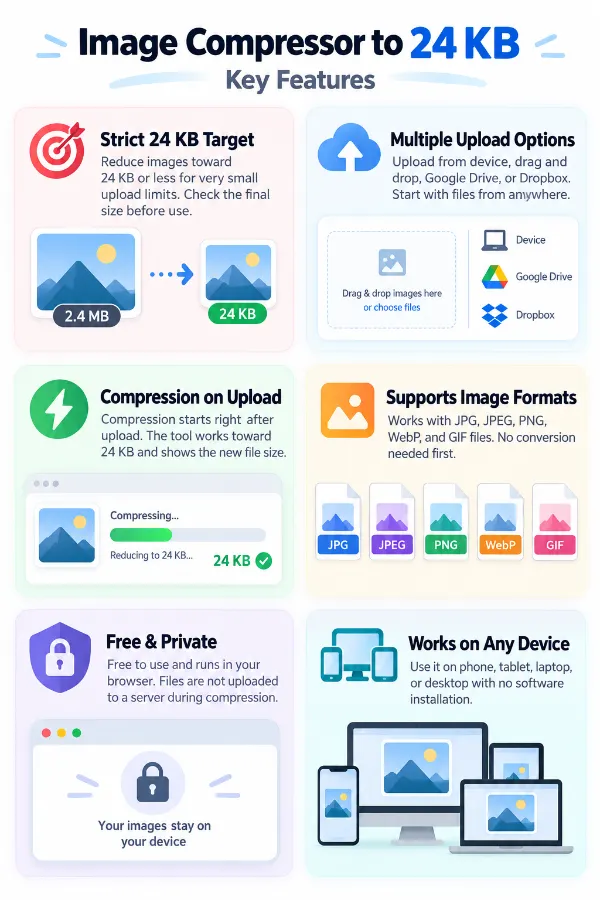
A Strict 24 KB Target
Reduce an image to 24 KB or lower when a website or application has a very small file-size limit. This gives you a specific target instead of requiring you to work out how much compression is needed. The final file size can be checked before you use the image.
Multiple Upload Options
Add an image from your device using Choose File or drag and drop. You can also select files directly from Google Drive or Dropbox. This lets you begin with the image wherever it is currently stored.
Compression Starts on Upload
The tool begins processing the image after you upload it without requiring complicated compression settings. It works toward the 24 KB target and produces a smaller image file. The new file size is then shown so you can check the result.
Supports Different Image Formats
The compressor accepts JPG, JPEG, GIF, PNG, and WebP formats. This lets you work with photographs, icons, and other commonly used image files. You can upload a supported format directly without converting it first.
Free Compression Without Server Uploads
The tool is free to use and processes images directly in your browser. Your files are not sent to a server during compression. This makes it suitable for compressing personal, professional, and confidential images.
Works on Any Device
Works on Any Device
Compress images from a mobile phone, tablet, laptop, or desktop through a web browser. The tool does not require separate software installation to process your image. This gives you a convenient way to prepare a 24 KB image wherever you are.
how to image

Steps to Compress the Image to 24 KB

  1. 1.Upload your image using any method.
  2. 2.The compressor will resize it to 24 KB or less.
  3. 3.Confirm the new image file size.
  4. 4.Click Download to save the compressed file.

FAQ's

Why does the 24 KB target matter when my image is only slightly above it?

A 24 KB limit means the file must stay within the specified maximum size. Even a 24.5 KB image may be rejected if the limit is 24 KB. The final file size needs to meet the stated limit.

Why can a tiny change in the original image affect the final compressed size?

Small changes such as adding an element, changing colors, or editing part of an image can alter how efficiently its data compresses. Two versions that look almost identical can therefore produce different file sizes. This is normal when working toward a very small target.

Why does the original file extension not tell me how large the compressed file will be?

An extension such as JPG, PNG, or WebP identifies the format, not the final amount of data stored in the file. Two files using the same extension can have very different sizes because their content and encoding differ. The actual file size can only be known after the image has been processed.

Why does a 24 KB target produce different results for different original file sizes?

The compressor has to reduce each image by a different amount to reach the same target. An image starting at 30 KB needs only a small reduction, while one starting at 2 MB requires a much larger change. This difference can affect the final appearance and file characteristics.

Can I compress the same image to 24 KB more than once?

The tool does not accept an image that is already 24 KB or below. If the first compressed version meets the target, you cannot process that same file again through the tool. For another compression attempt, use the original image.

Why does a 24 KB file sometimes have a larger file-size reduction than expected?

The target is based on the final file size rather than a fixed percentage reduction. An image may need to lose considerably more data than another image to reach the same 24 KB limit. The reduction percentage therefore varies from one image to another.

What happens when the original image contains a lot of unnecessary image data?

Extra image data increases the amount of information that needs to be stored in the file. Depending on the image, this can make reaching a 24 KB target more demanding. The resulting compressed copy should be treated as a separate reduced version of the original.

What does “24 KB or lower” actually mean?

It means the 24 KB figure is a maximum target rather than a requirement to produce exactly 24 KB. A result below the target can still satisfy a destination that specifies 24 KB as its maximum. The exact output size depends on the image being processed.

Why can an image with the same width and height become much smaller after compression?

The dimensions describe the number of pixels, while compression changes how the image data is stored. The same pixels can therefore be represented using substantially less file data. This allows an image to have unchanged dimensions while its file size drops significantly.

Why does adding a small amount of detail sometimes increase the file size considerably?

Compression efficiency depends on patterns and similarities within the image, not simply on how much visual space a new element occupies. A small amount of new detail can introduce additional information that needs to be stored. The resulting increase can be more noticeable when working with a very small target.

Can a file be too small to contain enough information even though it meets the 24 KB limit?

A numerical file size indicates how much storage the file uses but doesn't guarantee that the image retains all its original information at that size. Whether 24 KB is sufficient depends on the specific image and the details that need to be preserved.

Why is 24 KB very different from a “small” image?

A “small” has no precise file-size meaning, while 24 KB establishes a measurable limit. This makes it useful when a system has a specific maximum rather than a general preference for smaller files. The compressor can therefore work toward a clearly defined target.

Why shouldn't I judge compression by the percentage reduction alone?

A 90% reduction can mean very different things depending on the starting file size. Reducing 50 KB by 90% produces a very different result from reducing 5 MB by 90%. For a 24 KB target, the more useful measures are the final file size and whether the resulting image remains suitable for its intended purpose.

rating-img
Rate this tool
4.20/5   5 votes

Other useful information

Trusted by 100,000+ Users Every Month for Image Compression.

Fast, high-quality image compression you can rely on.

Review us on